8 Best Wireless Monitors in 2026
We found the 8 best wireless monitors in 2026, from battery-powered travel screens to budget-friendly portable displays. Compare specs, prices, and top picks.
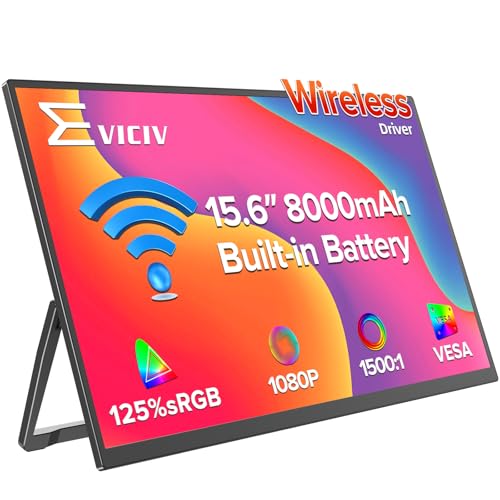 Wireless Portable Monitor with 8000mAh Battery
Reliable Runner-Up
Wireless Portable Monitor with 8000mAh Battery
Reliable Runner-Up
 MNN Portable Monitor 15.6inch FHD 1080P 60Hz USB C HDMI…
The Travel Kit
MNN Portable Monitor 15.6inch FHD 1080P 60Hz USB C HDMI…
The Travel Kit
 Wireless Portable Monitor with 8000mAh Battery- 15.6"…
Compare all 8
Tap a row to jump to the full review| # | Product | Score | Best for | |
|---|---|---|---|---|
| 1 |
Wireless Portable Monitor with 8000mAh BatteryBest Overall
|
9.6 | Professionals and travelers who need one monitor that works wirelessly for most tasks and wired for high-performance moments. | View on Amazon |
| 2 |
MNN Portable Monitor 15.6inch FHD 1080P 60Hz USB C HDMI…Reliable Runner-Up
|
9.4 | Users who want a reliable wireless monitor with a superior stand and extended warranty coverage. | View on Amazon |
| 3 |
Wireless Portable Monitor with 8000mAh Battery- 15.6"…The Travel Kit
|
9.2 | Travelers who want a one-box solution with keyboard and protective case included. | View on Amazon |
| 4 |

UPERFECT Wireless Portable Monitor with Battery 8000mAhBig Screen 100Hz
|
8.9 | Users who prioritize screen size and smooth refresh over maximum portability. | View on Amazon |
| 5 |

Portable Monitor 15.6 inchBudget Wireless, No Battery
|
8.5 | Budget-conscious users who work at a desk and want wireless convenience without paying for a battery they don't need. | View on Amazon |
| 6 |

HotYeah 18.5" 100Hz Wireless Portable Monitor…Color-Accurate Kickstand
|
8.2 | Home office users who want a color-accurate wireless second screen without paying extra for portability. | View on Amazon |
| 7 |

FMC Wireless Portable Monitor 1080P FHD 100% sRGB…Best Value Wired Portable
|
8.0 | Budget-focused users who don't need wireless and want a reliable portable second screen for occasional use. | View on Amazon |
| 8 |

Philips 24 inch 100Hz ComputerBest Wired Desktop Monitor
|
7.8 | Home office users who need a large, affordable desk monitor and don't require wireless connectivity. | View on Amazon |
Best for: Professionals and travelers who need one monitor that works wirelessly for most tasks and wired for high-performance moments.
Our verdictThe EVICIV is the wireless monitor that actually feels like a finished product.
- 15.6" FHD IPS matte display
- 8000mAh battery with 2-hour fast charging
- AirPlay / Miracast wireless casting
- Mini HDMI + 2x USB-C ports for wired backup
- Auto-rotation gravity sensor (phone only)
- True wireless operation without a router
- Reliable 5-hour battery life
- Hybrid wired/wireless versatility
- Very thin and light, includes VESA mount support
- Auto-rotation works only with phones, not laptops
- Brightness could be higher for outdoor use
- Price is mid-range, not the cheapest wireless option
Best for: Users who want a reliable wireless monitor with a superior stand and extended warranty coverage.
Our verdictThe MAGICRAVEN is almost identical to the EVICIV on paper, but a few details push it to second place.
- 15.6" FHD IPS matte 125% sRGB
- 8000mAh battery, 5-hour runtime
- AirPlay / Miracast wireless casting
- 180° adjustable metal stand
- Dual built-in speakers
- Sturdy metal stand, better than plastic kickstands
- Good color accuracy for a portable display
- Long warranty gives peace of mind
- Can be powered from a power bank
- Wireless battery life may be slightly overrated
- No Mini HDMI port (only USB-C)
- Speakers are weak for audio
Best for: Travelers who want a one-box solution with keyboard and protective case included.
Our verdictThe UPERFECT doesn't stop at being a wireless monitor: it includes a wireless keyboard and a padded carry bag, turning the whole package into a portable workstation.
- 15.6" FHD IPS matte, 125% sRGB, 350 nits
- 8000mAh battery, 3-4 hours wireless
- AirPlay / Miracast wireless casting
- USB-C + Mini HDMI wired backup
- Includes wireless keyboard, carry sleeve, and stand
- Complete travel setup with keyboard and bag
- Bright 350-nit screen works in varied light
- VESA mountable
- Hybrid wired/wireless flexibility
- Battery life shorter than competitors
- Wireless keyboard is basic
- Slightly heavier at 2.2 lbs with accessories
Best for: Users who prioritize screen size and smooth refresh over maximum portability.
Our verdictThe HotYeah breaks the 15.6-inch mold with an 18.5-inch screen.
- 18.5" FHD IPS, 100Hz refresh rate
- 10000mAh battery, 3-4 hours runtime
- AirPlay / Miracast wireless casting
- USB-C + HDMI wired backup
- 145% sRGB color gamut
- Larger 18.5" screen, great for multitasking
- 100Hz refresh for smooth motion
- Biggest battery capacity on this list
- Good color coverage for creative work
- Heavier and thicker than 15.6" models
- Wireless streaming of major services blocked by HDCP
- Most expensive option
Best for: Budget-conscious users who work at a desk and want wireless convenience without paying for a battery they don't need.
Our verdictThe iProda strips the wireless monitor down to the essentials: AirPlay and Miracast casting, a 15.6" FHD IPS matte screen, and a lightweight 1.3-pound body.
- 15.6" FHD IPS matte screen
- AirPlay / Miracast wireless casting
- No internal battery, powered via USB-C
- 1.3 lbs, 0.3" thin
- Includes leather case and foldable stand
- Very affordable for a wireless display
- Lightest wireless monitor we found
- No battery, so no swelling risk
- Includes protective case
- Requires continuous power, not truly portable
- Wireless performance depends on source device
- No wired HDMI port (only USB-C)
Best for: Home office users who want a color-accurate wireless second screen without paying extra for portability.
Our verdictThe FMC is one of the cheaper wireless options at $87, but it stands out for its built-in kickstand. No magnetic cover to fumble with, no separate stand to carry.
- 15.5" FHD IPS, 100% sRGB
- AirPlay / Miracast wireless casting
- Built-in integrated kickstand
- No internal battery, powered via USB-C
- 1-year hassle-free return policy
- Good color accuracy for the price
- Integrated kickstand, no separate parts
- Very low price for wireless functionality
- Easy wireless setup
- No battery, must be plugged in
- Heavier than other no-battery models
- Narrower viewing angle than competitors
Best for: Budget-focused users who don't need wireless and want a reliable portable second screen for occasional use.
Our verdictThe MNN is a wired portable monitor, but it's the most popular one on Amazon for good reason: at $49.99, it delivers a 15.6" 1080P IPS display that works with a single USB-C cable.
- 15.6" FHD IPS matte, 60Hz
- Wired via USB-C or HDMI
- 1.53 lbs, 0.3" thick
- Includes smart cover/stand
- HDR support
- Unbeatable price for a 1080P portable monitor
- Very portable, works with one cable
- Smart cover is both protector and stand
- Works with phones, laptops, and consoles
- No wireless connectivity
- Requires USB-C video output from host
- Only 60Hz refresh rate
Best for: Home office users who need a large, affordable desk monitor and don't require wireless connectivity.
Our verdictThe Philips 241V8LB is not a portable or wireless monitor. It's a 24-inch desktop display with a VA panel, Full HD resolution, and a 100Hz refresh rate.
- 23.8" FHD VA panel, 100Hz
- HDMI + VGA inputs
- VESA mount compatible
- 4-year advance replacement warranty
- EasyRead paper-like mode
- Large screen for under $80
- VA panel gives great contrast
- 100Hz refresh for smooth scrolling
- Strong warranty with advance replacement
- Not wireless or portable
- VGA input is aging, no USB-C
- Color accuracy not for professional photo work
How we picked
- Wireless freedom vs. battery life. A monitor that supports AirPlay and Miracast is only useful if the connection stays stable and the battery doesn't die mid-meeting. We prioritized models with at least an 8000mAh cell for several hours of untethered use. - Wired backup ports. Even the best wireless monitor will occasionally need a stable HDMI or USB-C connection for gaming or low-latency work. We considered how easily each model can switch to wired mode.
How to choose wireless monitor
Wireless Casting Protocol (AirPlay vs. Miracast)
Most wireless monitors support both AirPlay (for Apple devices) and Miracast (for Windows and Android). A model that does both is essential if you switch between devices. Some monitors also support direct casting without a Wi-Fi network, using a peer-to-peer connection. That's the most convenient setup. Beware of models that require a separate app or driver installation; the best ones need only a tap on your device's screen casting menu. Also note that streaming services with HDCP protection (Netflix, Hulu, Prime Video) will not work over wireless casting on any of these monitors, so you'll need a wired connection for those.
Battery Capacity and Runtime
If you want true wireless portability, battery size is everything. Look for at least 8000mAh, which typically gives 4 to 5 hours of use at normal brightness. A 10000mAh battery like the HotYeah's offers similar runtime on a larger screen. Models without a battery (like the iProda and FMC) are fine for desk use but won't free you from the wall outlet. Also check whether the monitor supports charging from a power bank, which adds flexibility.
Wired Backup Connectivity
Even the best wireless connection can lag in gaming or video editing. A monitor with HDMI and USB-C ports lets you switch to a stable wired connection when latency matters. Dual USB-C ports are convenient for daisy-chaining or power delivery. Some monitors have Mini HDMI instead of full-size, which is fine but requires an adapter for standard HDMI cables. Make sure your laptop or phone supports USB-C DisplayPort Alt Mode if you plan to use the wired USB-C connection.
Portability and Build
Weight matters: under 1.7 pounds is ideal for daily carrying. Thickness under 0.3 inches slides into laptop bags easily. The included stand should be sturdy enough to hold the screen at a comfortable angle. Foldable kickstands (like on the FMC) are less likely to break than magnetic folio covers. If you plan to mount the monitor to an arm, check for VESA 75mm compatibility.
Screen Quality
For a portable wireless monitor, target at least Full HD (1920x1080) resolution and an IPS panel for wide viewing angles. Color coverage of around 100% sRGB is good for general use; 125% or 145% sRGB is better for photo editing. Brightness of 300 to 350 nits is adequate for indoor use. A matte finish cuts glare significantly, which is important in coffee shops or near windows.
Price vs. Features
You'll pay a premium for wireless + battery. Expect $150 to $170 for a solid 15.6" model with 8000mAh. Dropping the battery brings the price under $100. A larger 18.5" screen with 100Hz costs over $220. For a wired desktop monitor, $80 buys you a 24" 100Hz display that will outlast any portable. Decide where your priority lies: true portability, budget, or desktop comfort.
Common questions
Can I use a wireless monitor with a gaming console?
Yes, but only over a wired connection. Consoles like PS5, Xbox Series X, and Switch do not support AirPlay or Miracast for screen mirroring. You'll need to connect via HDMI. Most wireless monitors have an HDMI port.
Does a wireless monitor work without Wi-Fi?
Yes. AirPlay and Miracast can create a direct peer-to-peer connection between your device and the monitor, so no router is needed. Just make sure both devices have Wi-Fi enabled (they don't need to be on the same network).
Why won't Netflix play on my wireless monitor?
Streaming services use HDCP (High-bandwidth Digital Content Protection) to prevent unauthorized copying. Wireless casting does not support HDCP, so Netflix, Hulu, Prime Video, and similar apps will show a black screen when you cast. Use a wired HDMI connection for those.
How do I set up a wireless monitor?
For most models, step 1: power on the monitor. Step 2: on your laptop or phone, open the screen casting menu (often called "Screen Mirroring" on Android, "AirPlay" on iOS, "Connect" on Windows). Step 3: select the monitor from the list.
Can I use a wireless monitor as a permanent second monitor?
You can, but it's not ideal. Wireless casting introduces slight latency and may occasionally drop. For a permanent desk setup, a wired portable monitor or a dedicated desktop monitor is more reliable. Wireless is best for temporary or travel use.